

Auctionator Profit Sort
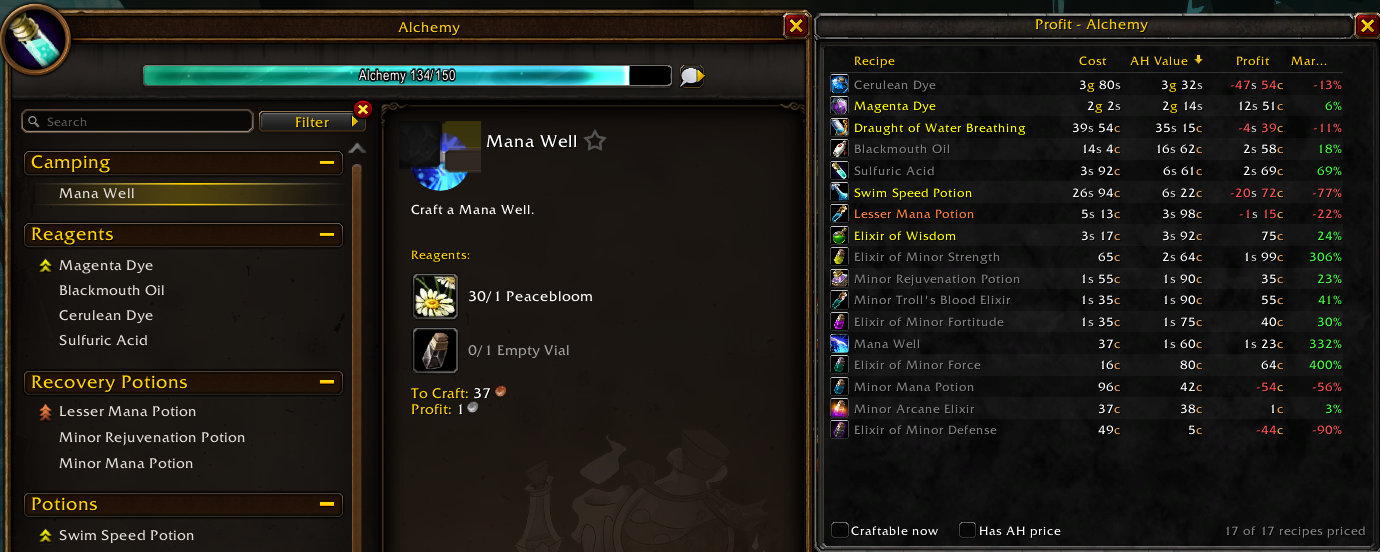
A World of Warcraft addon that lists your profession recipes sorted by profit, crafting cost, AH value or margin, using the price data collected by Auctionator.
Auctionator Profit Sort
AddOnv1.2.0
ProfessionsMIT
Game versions: Classic Era, TBC Classic, Wrath Classic, Mists of Pandaria Classic, Retail, WoW Forever
Requires Auctionator
Use: Lists your profession recipes sorted by profit, crafting cost or auction value, using Auctionator's price data.
“Buy low, craft, sell high.”
Released 14 Oct 2026
Features
- A panel docked next to the profession window, with one row per recipe:
- Cost: reagent cost. A known vendor price is used first, otherwise the Auctionator price. An orange
*means a reagent has no price. - AH Value: auction price × average amount made × 0.95 (the auction house cut).
- Profit and Margin (profit as a percentage of cost).
- Cost: reagent cost. A known vendor price is used first, otherwise the Auctionator price. An orange
- Click a column header to sort; click again to reverse the order.
- Per Skill: estimated cost per skill point (orange 100%, yellow ~75%, green ~25% chance). Sort by it to level a profession cheaply.
- Owned free option: count reagents already in your bags and bank as free.
- Craft queue + shopping list: right-click recipes to queue crafts, then Shopping list creates an Auctionator shopping list of the reagents you still need.
- Vendor flip finder: at any vendor, items worth at least 10% and 1 silver more on the auction house (after the 5% cut) get a green border, a "+profit" label and a tooltip line.
- Filters: Craftable now and Has AH price.
- Click a row to select the recipe in the profession window; Shift-click to link the item in chat.
- Tooltip with the reagent cost breakdown and the age of the auction price.
- Refreshes automatically after Auctionator scans and when your bags change.
Requirements
- Auctionator. Scan the auction house at least once so prices are available.
Usage
Open any profession. The panel appears on the right of the profession window.
| Command | Action |
|---|---|
/psort or /profitsort |
Show or hide the panel |
/psort reset |
Dock the panel next to the profession window again after you moved it |
/psort flips |
Turn the vendor flip marks off or on |
/psort options |
Open the options page (also in Esc > Options > AddOns) |
When the panel is closed, click the addon icon next to the profession window to open it again.
Installation
Install from CurseForge, or download the latest zip from Releases and extract it to Interface/AddOns. The folder must be named ProfitSort.
Changelog
1.2.0
- New vendor flip finder: at any vendor, items that sell for at least 10% and 1 silver more on the auction house (after the 5% cut) get a green border, a "+profit" label and a tooltip line. Works with Tylesser - Vendor Search filtering. Turn it off or on in the new options page (Esc > Options > AddOns > Tylesser - Auctionator Profit Sort, or
/psort options) or with/psort flips.
1.1.0
- New Per Skill column: estimated cost per skill point from the recipe's colour (orange 100%, yellow ~75%, green ~25%, gray none). Sort by it to find the cheapest way to level a profession.
- New craft queue and shopping list: right-click recipes to queue crafts (Shift-right-click to remove), then click Shopping list to create the Auctionator shopping list "Profit Sort" with the reagents you still need, minus what's in your bags and bank. At the auction house the search starts right away.
- New Owned free option: reagents already in your bags and bank count as free, so Cost and Profit show what crafting from your own stock earns. The tooltip shows how many of each reagent you have.
- The Margin column header is no longer cut off.
- When the panel is closed, the addon icon (instead of a "Profit" button) next to the profession window reopens it.
- Shorter status text ("17/17 priced") to make room for the new option.
1.0.0
- First release.
- Profit panel next to the profession window, listing each recipe's crafting cost, AH value, profit and margin.
- Click a column header to sort by it; click again to reverse.
- Filters: "Craftable now" and "Has AH price".
- Click a row to select the recipe, Shift-click to link the item.
- Tooltip with reagent cost breakdown and price age.
- Works with the classic trade skill window, the classic craft (Enchanting) window and the modern Professions window.