

Vendor Search
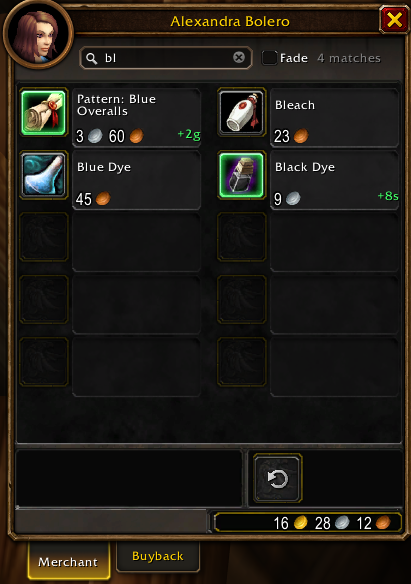
A World of Warcraft addon that adds a search box to the vendor window. Type part of an item's name, type or equipment slot and the vendor window shows only the matching items. No extra windows.
Vendor Search
AddOnv1.0.0
VendorsMIT
Game versions: Classic Era, TBC Classic, Wrath Classic, Mists of Pandaria Classic, Retail, WoW Forever
Use: Adds a search box to the vendor window that filters its items by name, type or equipment slot.
“Somewhere on this vendor there is a vial. Probably.”
Released 20 Oct 2026
Features
- Search box on the vendor window. Each word you type must match the item's name, type, subtype or equipment slot:
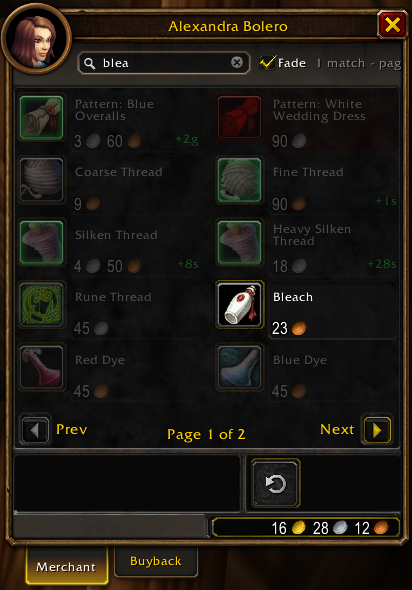
vial,recipe cooking,head,thread... - Filters the vendor's own item grid, across all pages. The page count updates to the matching items ("Page 1 of 2").
- Matching items work exactly like normal: right-click to buy, tooltips, Shift-click to link, Ctrl-click to preview, drag to your bags. Items that cost tokens or currency still show Blizzard's confirmation.
- Shows how many items match, or "No items match your search."
- Fade option: instead of hiding items, keep the vendor's normal pages and fade the ones that don't match. The match count lists the pages with matches, and the vendor turns to the first one (or press Enter).
- With an empty search box the vendor window looks and behaves exactly as without the addon.
- The search is cleared when you close the vendor. The box hides on the Buyback tab.
- Alt-drag the search box to move it; the position is saved.
Usage
Talk to any vendor and type in the search box at the top of the vendor window.
/vsearch: put the cursor in the search box/vsearch reset: move the search box back to its default place
Installation
Install from CurseForge, or download the latest zip from Releases and extract it to Interface/AddOns. The folder must be named VendorSearch.
Changelog
1.0.0
- First release.
- Search box on the vendor window that filters the vendor's item grid by item name, type, subtype or equipment slot.
- Paging follows the matching items; matching items keep all the normal vendor actions (right-click to buy, tooltips, linking, preview).
- Match count and "no matches" message; search clears when the vendor closes.
- Fade option: fade non-matching items on the vendor's normal pages instead of hiding them, with the pages that contain matches listed.
- Alt-drag to move the search box,
/vsearch resetto put it back.